

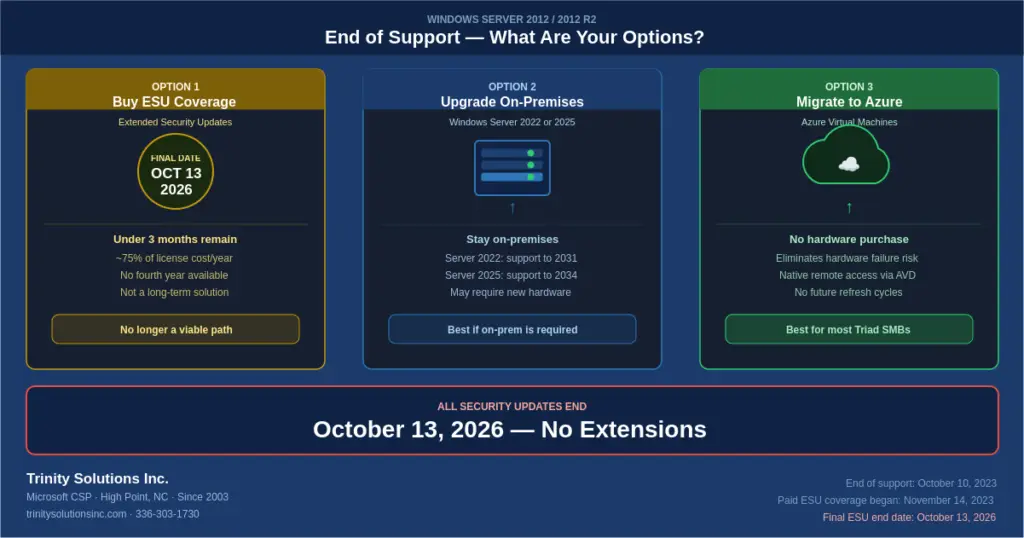
Windows Server 2012 and Windows Server 2012 R2 reached end of support on October 10, 2023. Paid Extended Security Updates extended protection for three more years, and those end permanently on October 13, 2026 — the final date, with no further extensions from Microsoft.
That leaves roughly three months. After October 13, 2026, there is no supported path to keep patching these servers on-premises at any price.
If you’re still running Server 2012 or 2012 R2, you’re not alone, and nothing breaks on that date — the server keeps booting, keeps serving files. What ends is any ability to fix security problems. Below are the official Microsoft lifecycle dates, what end of support actually means in practice, and an honest comparison of the three paths available to you.
Windows Server 2012 & 2012 R2 End of Support Dates — Official Microsoft Lifecycle
| Milestone | Windows Server 2012 | Windows Server 2012 R2 |
|---|---|---|
| Release date | September 4, 2012 | October 17, 2013 |
| Mainstream support ended | October 9, 2018 | October 9, 2018 |
| Extended support ended (EOS) | October 10, 2023 | October 10, 2023 |
| Paid ESU coverage began | November 14, 2023 | November 14, 2023 |
| Final ESU end date | October 13, 2026 | October 13, 2026 |
Quick Answers
When did Windows Server 2012 R2 reach end of life?
October 10, 2023 — that's the official Microsoft end-of-support date for both Server 2012 and 2012 R2.
When do Server 2012 ESUs expire?
October 13, 2026. This is the third and final annual ESU term. Microsoft has confirmed no further extensions.
Is Windows Server 2012 R2 still supported?
No. It receives no security updates unless covered by a paid ESU subscription on-premises or running in Azure — and both end October 13, 2026.
What's the difference between "end of life" and "end of support"?
Nothing practical — they're used interchangeably. Microsoft's official term is "end of support." The date is the same.
What “End of Support” Actually Means (And What It Doesn’t)
End of support doesn’t mean your server stops working on a specific date. Windows Server 2012 R2 still boots, still runs applications, still serves files. What ends is Microsoft’s commitment to fix security problems.
Microsoft’s support lifecycle has three phases:
Mainstream Support
Security patches plus new features, bug fixes, and warranty claims. Ended: October 9, 2018Extended Support
Security patches only — no new features. Ended: October 10, 2023Extended Security Updates (Paid)
Critical and important security patches only, sold in three annual increments. The last line of protection. Ends: October 13, 2026What This Means in Practice
Every CVE (Common Vulnerability and Exposure) published after October 13, 2026 that affects Windows Server 2012 R2 will never be patched. Researchers publish these vulnerabilities publicly. Attackers read the same bulletins you do — and they specifically target end-of-life systems because they know the holes will never be fixed. Running unpatched EOL server software is one of the most common findings in post-breach investigations. If you’re not on a current ESU subscription, that has already been true since October 2023.The Real Risks of Staying on Server 2012 R2
Beyond the security exposure, running end-of-life server software creates problems in several other areas:⚠ Cyber Insurance Complications
Many cyber insurance policies now specifically ask whether you’re running end-of-life operating systems. Answering yes — or failing to disclose it — can result in claim denial after a breach. If your renewal is coming up, this is a question you’ll need to answer honestly.⚠ Compliance Violations
HIPAA, PCI DSS, and SOC 2 frameworks all require that systems be patched and maintained. Running end-of-life software that cannot receive patches is a direct compliance violation. If you’re subject to any of these frameworks, your auditor will flag it.⚠ Software Compatibility Gaps
Application vendors are already dropping Server 2012 R2 support from their products. If you need to update your ERP, accounting software, or line-of-business application, you may find the new version won’t install on Server 2012 R2 — forcing an emergency OS upgrade at the worst possible time.⚠ Hardware Failure Risk
Servers running Windows Server 2012 R2 are typically 12+ years old. Hardware failure on aging equipment often means an emergency rebuild — finding replacement parts, sourcing a compatible server, and rebuilding from backup under pressure. Planning your migration is always better than being forced into it by a dead server at 2am. And if you’re already planning around 2012 R2, note that the next deadline is close behind: Windows Server 2016 reaches end of life on January 12, 2027 — worth factoring into any migration you scope now.Your Three Options — Compared Honestly
There’s no single right answer for every business. Here’s an honest breakdown of each path as it stands in 2026:Option 1: Purchase Extended Security Updates (ESU)
Microsoft offered paid Extended Security Updates for Server 2012/2012 R2 in three annual increments beginning November 14, 2023. The third and final term ends October 13, 2026. There is no fourth year and no further extension — after that date, no supported mechanism exists to patch these systems on-premises. ✓ What’s good about it:- Keeps you patched and defensible through the remaining term
- No immediate disruption to operations
- Expensive — roughly 75% of server license cost per year
- Year 3 is the last one. It ends October 13, 2026 with no renewal available
- Buying in now covers a partial term at full annual cost
Option 2: Upgrade to Windows Server 2022 or 2025 (On-Premises)
If you want to stay on-premises, upgrading the OS on your existing hardware (or new hardware) gets you back to a fully supported, patchable platform. Windows Server 2019 is in extended support through January 9, 2029. Windows Server 2022 is supported through October 14, 2031. Windows Server 2025 is the current release and carries the longest runway — worth specifying if you’re buying new hardware now. ✓ What’s good about it:- Stays on-premises if that’s a hard requirement
- Familiar environment for your IT team
- No ongoing cloud consumption costs
- Predictable fixed cost once completed
- In-place upgrades are risky — we recommend a swing migration
- May require new hardware if current servers are aging
- Hardware refresh cost ($15,000–$40,000 depending on environment)
- Server 2019 is already past mainstream support — specify 2022 or 2025 for a new build
- You’ll face this same decision again in 6–8 years
Option 3: Migrate to Microsoft Azure
Migrating your Server 2012 R2 workloads to Azure Virtual Machines gets you onto modern infrastructure without a hardware purchase, and positions the OS upgrade to land on a currently supported version.Important as of 2026
The free ESU benefit for Server 2012/2012 R2 workloads in Azure also ends October 13, 2026. Migrating to Azure no longer buys you extra patch time — that window has closed. What it buys you is a modern platform without a capital hardware purchase. Plan for a Windows Server 2022 or 2025 target, not a lift-and-shift of the 2012 R2 image. ✓ What’s good about it:- No hardware refresh investment required
- Eliminates hardware failure risk immediately
- Enables remote work via Azure Virtual Desktop
- Azure Hybrid Benefit may reduce licensing cost
- No future hardware refresh cycles
- One-time migration project cost
- Ongoing monthly Azure consumption cost
- Requires reliable internet connectivity
- Application compatibility testing required
Side-by-Side Comparison
| Factor | ESU (Buy Time) | Upgrade On-Prem | Migrate to Azure |
|---|---|---|---|
| Upfront cost | Low | Medium–High | Medium |
| Ongoing cost | High — and ends Oct 13, 2026 | Low after upgrade | Monthly Azure + MSP |
| Security patches | Only until Oct 13, 2026 | Yes (fully supported) | Yes (on supported OS) |
| Hardware refresh | Still needed | Required | Not needed |
| Remote work | No improvement | Requires VPN | Native via AVD |
| Disruption to ops | Minimal | Moderate | Minimal (with planning) |
| Long-term solution | No — expires Oct 13, 2026 | Yes (8–10 years) | Yes (no refresh cycles) |
| Best timeline | No longer viable — under 3 months left | If staying on-prem is required | Most SMBs with aging hardware |