If you’ve been thinking about moving your business to the cloud but can’t get a straight answer on what it actually costs — you’re not alone. Search “cloud migration cost” and you’ll find everything from “$0 with free tiers” to “$500,000 enterprise projects.” Neither number helps a 20-person manufacturing company in Greensboro trying to figure out whether to replace their aging server.
This post is for small and mid-sized businesses in the $500K–$20M revenue range with 5–100 employees. We’ll break down what cloud migration actually costs — one-time migration costs, ongoing monthly costs, and the hidden costs most people forget to factor in. We’ll also share a real example from a recent assessment we did for a local professional services firm.
What Actually Drives Cloud Migration Cost
Cloud migration cost isn’t a fixed number — it’s a function of your specific environment. The main variables are:
- ›Number and size of servers — how many physical or virtual servers are you moving, and what workloads do they run?
- ›Data volume — how much data needs to move, and how fast does it need to transfer?
- ›Application complexity — off-the-shelf software migrates easily; custom or legacy applications take more work
- ›Connectivity requirements — do you need a site-to-site VPN between your office and Azure?
- ›Compliance requirements — HIPAA, SOC 2, or PCI add documentation and configuration overhead
- ›Migration approach — lift-and-shift (move as-is) vs. re-architect (rebuild for the cloud) have very different cost profiles
For most SMBs, a lift-and-shift migration to Microsoft Azure is the right starting point — it’s faster, lower risk, and gets you to the cloud without having to rewrite anything. That’s the scenario we’ll focus on here.
A Real Example: What We Found for a Local Professional Services Firm
Real Client Assessment
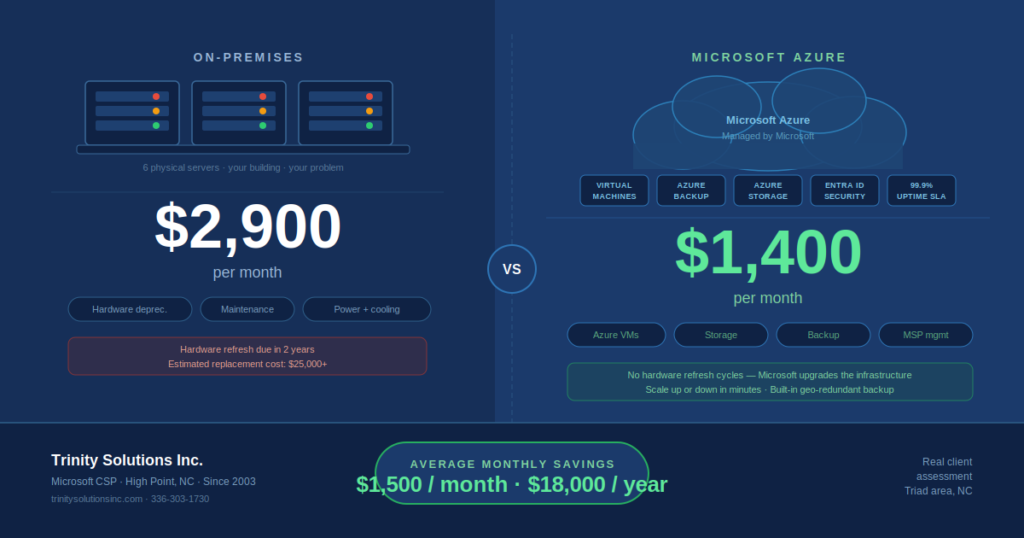
We recently completed an infrastructure assessment for a Triad-area professional services firm evaluating whether to migrate to Azure. Their environment: 6 on-premises servers, 2 VLANs, approximately 25 users.
Here’s how their costs compared:
| Cost Category | On-Premises | Azure (Cloud) |
|---|---|---|
| Hardware depreciation | $1,100/mo | $0 |
| Maintenance contracts | $600/mo | $0 |
| Power & cooling | $200/mo | $0 |
| MSP management fees | $1,000/mo | $1,000/mo |
| Azure consumption | $0 | $400–$500/mo |
| Total Monthly Cost | ~$2,900/mo | ~$1,400–$1,500/mo |
That’s a savings of roughly $1,400 to $1,500 per month — or $16,800 to $18,000 per year. And that’s before factoring in the server hardware refresh they were approaching (approximately $25,000 in new equipment that’s now off the table entirely).
One-Time Migration Costs: What to Budget
The monthly savings are compelling, but migration isn’t free. Here’s what you’ll typically spend once to get there:
Infrastructure Assessment
Before anyone touches anything, a good MSP will document your current environment, identify migration risks, and build a detailed project plan. This is where you find out if any of your applications have dependencies that complicate the move. We provide this free for qualified prospects — most MSPs charge $500–$2,500 for a thorough assessment.
Data Migration
Moving files, databases, and application data to Azure. Cost depends heavily on data volume and whether any transformation is required. For a typical SMB (2–10TB of data), budget $1,000–$5,000 depending on complexity.
VM Provisioning and Configuration
Setting up your Azure Virtual Machines, configuring networking, security groups, and integrating with your existing Microsoft 365 environment. For a 4–6 server environment, this typically runs $2,000–$6,000 in professional services time.
Application Testing and Validation
Before you cut over, every application needs to be tested in the new environment. Budget 15–20% of your total migration cost for a thorough testing phase — cutting this short is where migrations go wrong.
VPN and Hybrid Connectivity
If you’re keeping any on-premises resources or connecting branch offices to Azure, you’ll need a site-to-site VPN. This can typically be configured on your existing firewall (Meraki, Sophos, Fortinet) for minimal additional cost, or provisioned through Azure VPN Gateway for $100–$200/month.
Total One-Time Range
2–3 servers, standard apps
4–8 servers, mixed workloads
Legacy apps, compliance, large data
Ongoing Monthly Azure Costs: What You’ll Pay After Migration
Once you’re in Azure, your monthly bill has several components:
Azure Virtual Machines
This is typically the largest line item. A Standard B2ms VM (2 vCPUs, 8GB RAM — suitable for a file server or application server) runs approximately $60–$80/month on pay-as-you-go pricing, or $35–$50/month on a 1-year Reserved Instance. Most SMB environments run 2–6 VMs.
Storage
Azure managed disks and file storage. A typical SMB with 2–5TB of data pays $50–$200/month depending on storage tier and redundancy level.
Azure Backup
Backup costs depend on data volume and retention period. Budget $30–$100/month for comprehensive VM and file backup with 30-day retention.
SQL Databases
If your business runs any SQL-backed applications — ERP systems, accounting software, custom line-of-business apps, or e-commerce backends — database hosting is a cost variable that can significantly affect your monthly Azure bill, and it’s one that often gets underestimated in early assessments.
You have two main options in Azure:
SQL Server on a VM
Run SQL Server on an Azure Virtual Machine — same as your current on-premises setup, just hosted in Azure. You manage the OS, SQL Server patches, and backups.
Azure SQL Database (PaaS)
A fully managed SQL database service — Microsoft handles patching, backups, and high availability. No VM to manage. Better fit for applications that support it.
Watch Out For
SQL Server licensing is one of the most common surprise costs in Azure migrations. If you’re running SQL Server Standard or Enterprise on-premises under a volume license, you may already have Azure Hybrid Benefit rights — which lets you bring your existing SQL license to Azure and avoid paying for it again. We check this in every assessment. Without Hybrid Benefit applied, SQL Server licensing alone can add $100–$500/month to your Azure bill.
For businesses running multiple SQL databases — for example, a separate database per application or per client — costs scale accordingly. A manufacturer running a legacy ERP with a dedicated SQL backend plus a reporting database could easily add $300–$600/month in database costs alone. Getting this modeled accurately before migration is one of the key reasons a thorough assessment matters.
Networking
Bandwidth egress costs are usually minor for SMBs — typically $10–$30/month unless you’re moving large amounts of data out of Azure regularly.
VPN & Remote Access
If your business has multiple office locations that need to connect to Azure, or remote workers who need secure access to resources hosted in Azure, you’ll need a VPN solution. There are two common approaches — and they have meaningfully different cost profiles.
Azure VPN Gateway
Microsoft’s native VPN service — creates an encrypted tunnel between your on-premises network (or remote users) and your Azure Virtual Network. No additional hardware required. Managed entirely in Azure.
Existing Firewall Integration
If you already have a business-grade firewall on-premises — Meraki, Sophos, Fortinet, or similar — we can configure a site-to-site VPN tunnel directly from your existing hardware to Azure at little or no additional monthly cost.
What About Remote Users?
For individual remote workers, you have three good options depending on how they’re working:
- ›Azure Virtual Desktop (AVD) — users connect to a full Windows desktop hosted in Azure from any device via a browser or the Remote Desktop app. No VPN needed — access is brokered through Microsoft’s secure gateway. This is the cleanest solution for remote work and is especially popular with CPA firms and professional services companies. Cost is per-user licensing plus VM compute.
- ›Point-to-Site VPN — individual users install a VPN client on their device and connect directly to the Azure VPN Gateway. Good for occasional access to Azure-hosted file shares or applications. Included in the Azure VPN Gateway cost above.
- ›Network Virtual Appliance (NVA) — for larger or more security-conscious environments, a virtual firewall running in Azure (Sophos, Fortinet, Palo Alto) provides enterprise-grade traffic inspection and segmentation. This adds $200–$800/month depending on the solution, but is typically reserved for organizations with compliance requirements or complex multi-site architectures.
Money-Saving Tip
Many SMBs already have a Meraki or Sophos firewall on-premises. In most cases we can configure a site-to-site VPN tunnel from your existing hardware directly to Azure — eliminating the need to pay for Azure VPN Gateway at all. This is one of the first things we check during an assessment, and it saves most clients $140–$300/month right out of the gate.
Microsoft 365 Licensing
If you’re already paying for M365, this doesn’t change. If you’re migrating from on-premises Exchange, this becomes a new line item — typically $12–$22/user/month depending on the plan.
Typical Monthly Total (10–50 Users)
| Azure VMs (3–5 servers) | $150–$400/mo |
| Storage (2–5TB) | $50–$150/mo |
| Azure Backup | $30–$80/mo |
| SQL Database (if applicable) | $80–$300/mo |
| Networking/egress | $10–$30/mo |
| VPN Gateway (if no existing firewall) | $0–$400/mo |
| Azure consumption total | $320–$1,360/mo |
Add your MSP’s managed services fee on top of that, and most SMBs with 10–50 users land between $500 and $1,500/month total for a fully managed Azure environment — compared to $1,500–$3,500/month for equivalent on-premises infrastructure when you account for all costs honestly.
The Hidden Costs People Forget to Factor In
When comparing on-premises vs. cloud costs, these often get left out of the on-premises side of the equation:
- ›Hardware refresh cycles — servers need replacement every 5–7 years. That’s a $15,000–$40,000 capital expenditure that disappears in the cloud.
- ›UPS and power infrastructure — uninterruptible power supplies, PDUs, and the power costs to run them 24/7.
- ›Physical security — if your server is in a closet or a server room, you’re responsible for physical access controls, environmental monitoring, and fire suppression.
- ›Downtime cost — on-premises servers fail. When they do, someone pays for emergency hardware, emergency labor, and lost productivity. Azure’s SLA is 99.9%+ with built-in redundancy.
- ›Opportunity cost — every hour your IT team spends on server maintenance is an hour not spent on work that moves the business forward.
Three Ways to Reduce Your Azure Costs After Migration
Reserved Instances
If you have predictable, always-on workloads (most production servers qualify), committing to a 1-year or 3-year Reserved Instance reduces your VM cost by 30–40% compared to pay-as-you-go pricing. This is one of the first things we recommend after migration.
Right-Sizing
Most on-premises servers are oversized relative to their actual workload — IT teams buy for peak capacity plus headroom. In Azure, you pay for what you use, and you can resize a VM in minutes. We review VM utilization quarterly for all managed clients and right-size where appropriate.
Auto-Shutdown for Non-Production Resources
Dev, test, and staging environments don’t need to run 24/7. Configuring auto-shutdown for non-production VMs can cut those specific costs by 60–70% with no impact on your production environment.
Is Cloud Migration Worth It for a Small Business?
For most SMBs with aging on-premises infrastructure, the answer is yes — but the math is more nuanced than “cloud is always cheaper.” Here’s a simple framework:
✓ Cloud makes strong financial sense when:
- ›Servers within 2–3 years of replacement
- ›Remote or hybrid workers struggling with access
- ›Paying for capacity you don’t consistently use
- ›Downtime is expensive for your business
- ›Compliance audit approaching (HIPAA, SOC 2)
✕ Cloud may not pencil out when:
- ›Servers less than 3 years old
- ›Specialized hardware that can’t be virtualized
- ›Unreliable internet connectivity
- ›Strict data residency requirements
Get a Real Number for Your Specific Environment
The ranges in this post are useful for ballpark planning, but the only way to get an accurate number is to model your specific environment. That means looking at your actual servers, workloads, data volumes, and current costs — not industry averages.
We provide a free 30-minute cloud cost assessment for Triad-area businesses. We’ll review your current environment, build an Azure cost model, and give you a straight comparison — no obligation, no sales pressure. If cloud doesn’t make financial sense for you right now, we’ll tell you that too.
Ready to see what cloud would cost for your business?
Trinity Solutions has been managing IT infrastructure for Triad businesses since 2003. We’re a Microsoft CSP with hands-on Azure experience across manufacturing, professional services, healthcare, and more.
Request Your Free Cloud AssessmentRelated reading: Our complete guide to Microsoft Azure & cloud server management for Triad businesses | Disaster Recovery Planning Services | Managed IT Services