If you’re still running Windows Server 2012 or Windows Server 2012 R2 in your environment, you’re not alone — and you’re not necessarily in immediate danger. But you are running on borrowed time, and the clock has been ticking since October 10, 2023, when Microsoft officially ended extended support for both versions.
That date matters because it’s the point at which Microsoft stopped releasing security patches. No patches means every new vulnerability discovered after that date is a permanent, unpatched hole in your server — and attackers know exactly which versions are end-of-life and which vulnerabilities are being published without fixes. This post covers what end of life actually means, what your real options are, and how to think through which path makes sense for your business.
What “End of Life” Actually Means (And What It Doesn’t)
End of life doesn’t mean your server stops working on a specific date. Windows Server 2012 R2 still boots, still runs applications, still serves files. What ends is Microsoft’s commitment to fix security problems.
Microsoft’s support lifecycle has two phases:
Mainstream Support
Security patches plus new features, bug fixes, and warranty claims. Ended for Server 2012/2012 R2 in 2018.
Extended Support
Security patches only — no new features. This is the last line of protection. Once this ends, no more patches. Ever.
What This Means in Practice
Every CVE (Common Vulnerability and Exposure) published after October 10, 2023 that affects Windows Server 2012 R2 will never be patched. Researchers publish these vulnerabilities publicly. Attackers read the same bulletins you do — and they specifically target end-of-life systems because they know the holes will never be fixed. Running unpatched EOL server software is one of the most common findings in post-breach investigations.
The Real Risks of Staying on Server 2012 R2
Beyond the security exposure, running end-of-life server software creates problems in several other areas:
Cyber Insurance Complications
Many cyber insurance policies now specifically ask whether you’re running end-of-life operating systems. Answering yes — or failing to disclose it — can result in claim denial after a breach. If your renewal is coming up, this is a question you’ll need to answer honestly.
Compliance Violations
HIPAA, PCI DSS, and SOC 2 frameworks all require that systems be patched and maintained. Running end-of-life software that cannot receive patches is a direct compliance violation. If you’re subject to any of these frameworks, your auditor will flag it.
Software Compatibility Gaps
Application vendors are already dropping Server 2012 R2 support from their products. If you need to update your ERP, accounting software, or line-of-business application, you may find the new version won’t install on Server 2012 R2 — forcing an emergency OS upgrade at the worst possible time.
Hardware Failure Risk
Servers running Windows Server 2012 R2 are typically 10+ years old. Hardware failure on aging equipment often means an emergency rebuild — finding replacement parts, sourcing a compatible server, and rebuilding from backup under pressure. Planning your migration is always better than being forced into it by a dead server at 2am.
Your Three Options — Compared Honestly
There’s no single right answer for every business. Here’s an honest breakdown of each path:
Purchase Extended Security Updates (ESU)
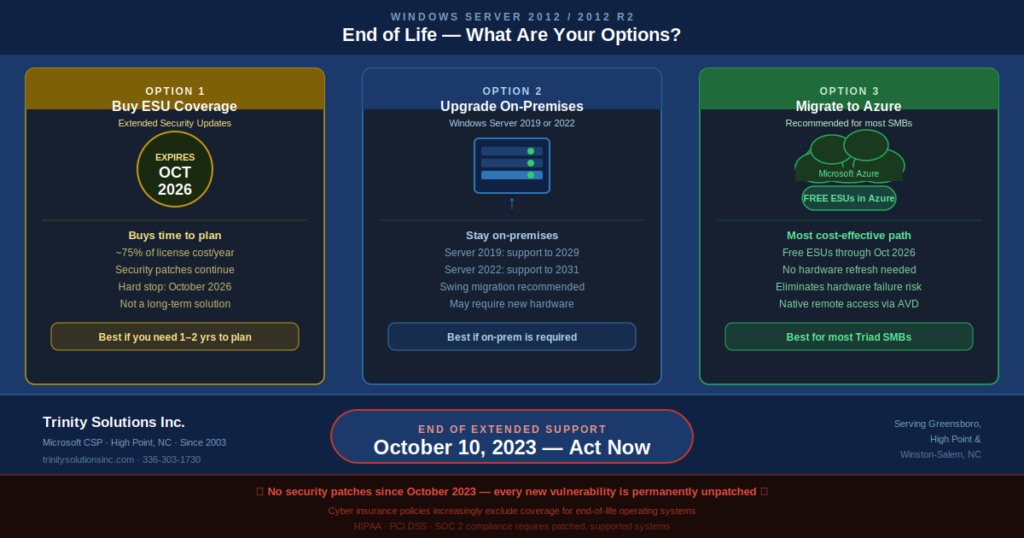
Microsoft offers paid Extended Security Updates for Server 2012/2012 R2 — essentially buying continued security patches beyond the end-of-life date. ESUs are available for up to 3 years (through October 2026) and are sold in annual increments.
✓ What’s good about it:
- ›Buys time to plan a proper migration
- ›No immediate disruption to operations
- ›Keeps you patched and defensible
✕ What’s not great:
- ›Expensive — roughly 75% of server license cost per year
- ›Delays the inevitable — you still have to migrate eventually
- ›Hard limits expire October 2026 — no further extensions
Best for: Businesses that need 12–24 months to plan and execute a migration without disrupting operations. ESU is a bridge, not a destination.
Upgrade to Windows Server 2019 or 2022 (On-Premises)
If you want to stay on-premises, upgrading the OS on your existing hardware (or new hardware) to Windows Server 2019 or 2022 gets you back to a fully supported, patchable platform. Windows Server 2019 has mainstream support through 2024 and extended support through 2029. Windows Server 2022 is the current version with support through 2031.
✓ What’s good about it:
- ›Stays on-premises if that’s a hard requirement
- ›Familiar environment for your IT team
- ›No ongoing cloud consumption costs
- ›Predictable fixed cost once completed
✕ What’s not great:
- ›In-place upgrades are risky — we recommend a swing migration
- ›May require new hardware if current servers are aging
- ›Hardware refresh cost ($15,000–$40,000 depending on environment)
- ›You’ll face this same decision again in 6–8 years
Best for: Businesses with specialized hardware requirements, air-gapped environments, or specific compliance reasons that require on-premises infrastructure. Also a good fit when servers are less than 3 years old and hardware refresh cost is already sunk.
Migrate to Microsoft Azure
Migrating your Server 2012 R2 workloads to Azure Virtual Machines accomplishes two things at once: you get off end-of-life software, and you get free Extended Security Updates automatically applied in Azure while you plan a full OS upgrade on your timeline. Microsoft provides ESUs at no additional cost for Server 2012/2012 R2 workloads running in Azure — through October 2026.
Free ESUs in Azure — This Is a Big Deal
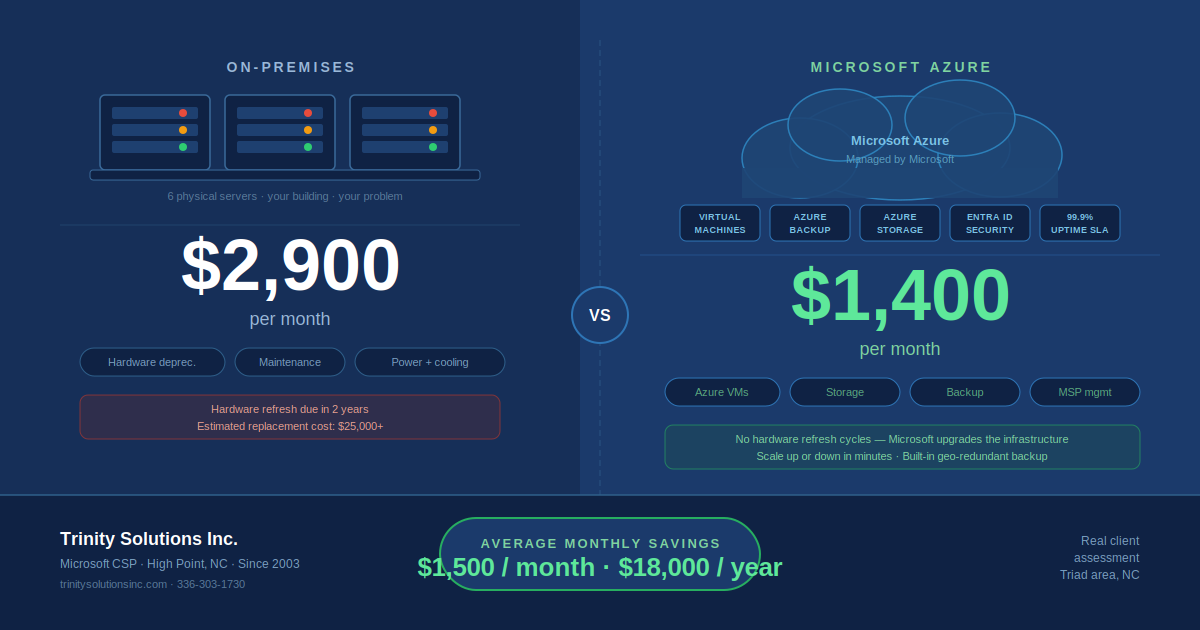
On-premises ESUs cost roughly 75% of your server license per year. In Azure, they’re included automatically at no extra charge. For a business with 4 servers running Server 2012 R2, the ESU savings alone can offset a meaningful portion of the Azure migration cost.
✓ What’s good about it:
- ›Free ESUs in Azure through October 2026
- ›No hardware refresh investment required
- ›Eliminates hardware failure risk immediately
- ›Enables remote work via Azure Virtual Desktop
- ›Azure Hybrid Benefit may reduce licensing cost
✕ What to plan for:
- ›One-time migration project cost
- ›Ongoing monthly Azure consumption cost
- ›Requires reliable internet connectivity
- ›Application compatibility testing required
Best for: Most SMBs with aging hardware, remote workers, or growth plans. The free ESU benefit in Azure makes this the most cost-effective path for businesses that aren’t locked into on-premises for specific reasons.
Side-by-Side Comparison
| Factor | ESU (Buy Time) | Upgrade On-Prem | Migrate to Azure |
|---|---|---|---|
| Upfront cost | Low | Medium–High | Medium |
| Ongoing cost | High (ESU fees) | Low after upgrade | Monthly Azure + MSP |
| Security patches | Yes (paid) | Yes (fully supported) | Yes (free ESU in Azure) |
| Hardware refresh | Still needed | Required | Not needed |
| Remote work | No improvement | Requires VPN | Native via AVD |
| Disruption to ops | Minimal | Moderate | Minimal (with planning) |
| Long-term solution | No — expires 2026 | Yes (8–10 years) | Yes (no refresh cycles) |
| Best timeline | If you need 1–2 years to plan | If staying on-prem is required | Most SMBs with aging hardware |
What We Typically Recommend for Triad SMBs
We’ve been working through Server 2012 R2 migrations with clients across the Piedmont Triad since before the EOL date — and the path we recommend most often is Azure migration using a swing migration approach.
Here’s why: a swing migration means we build the new Azure environment in parallel, migrate and validate everything before cutting over, and only decommission the old servers after everything is confirmed working. No in-place upgrades, no gambling with your production environment, and minimal downtime — typically a planned maintenance window of a few hours for the final cutover.
The free ESU benefit in Azure is genuinely significant. For clients with 3–6 servers still on 2012 R2, the ESU cost savings over 2–3 years can offset a meaningful portion of the migration cost itself. And you end up with a modern, cloud-hosted environment instead of another on-premises server that will need attention again in 5–7 years.
That said — if you have specific hardware dependencies, a very recent hardware investment, or compliance requirements that mandate on-premises, the Server 2019 upgrade path is perfectly valid. We’ll tell you which one makes sense for your environment after looking at it.
What a Server 2012 R2 Migration Actually Involves
Whether you go to Azure or upgrade on-premises, a well-executed migration follows the same general phases:
Discovery & Assessment
Document every role and application running on the server. Identify dependencies — what talks to what, what ports are open, what scheduled tasks run, what backup agents are installed. This is where surprises get found, not during the migration.
Build the New Environment
Provision the new server (Azure VM or on-premises hardware), install Windows Server 2019 or 2022, configure roles and features, and install applications. For Azure, this includes VNet configuration, NSG rules, backup policy setup, and VPN or hybrid connectivity.
Data Migration & Testing
Move data to the new server and validate everything works — applications launch, shared drives are accessible, scheduled jobs run, integrations function. Users test in the new environment before cutover. This phase is where most of the time is spent, and rightfully so.
Cutover & Decommission
Schedule a maintenance window (typically evenings or weekends), perform the final data sync, update DNS and access points to point to the new server, and confirm everything is working. The old server stays powered off (not deleted) for 30 days as a fallback, then is decommissioned.
Don’t Wait for a Breach or a Dead Server to Force the Issue
The businesses that handle Server 2012 R2 migrations well are the ones that plan them on their own timeline — not the ones responding to a ransomware attack on an unpatched server or an emergency rebuild after a hardware failure at the worst possible time.
If you’re not sure which path is right for your environment, we can help you figure it out. We’ve done these migrations across manufacturing companies, CPA firms, professional services businesses, and more in the Greensboro, High Point, Winston-Salem, and surrounding Triad area. We’ll look at your environment, tell you what we’d recommend, and give you a clear picture of what it would involve and cost — no obligation.
Still running Windows Server 2012 R2?
Let’s assess your environment and figure out the right path — ESU, on-premises upgrade, or Azure migration. Free 30-minute consultation, no commitment required.
Schedule a Free AssessmentRelated reading: Microsoft Azure & Cloud Server Management for Triad Businesses | Disaster Recovery Planning Services | Managed IT Services